How do I generate the CDSL TPIN required to authorise my CNC sell transactions?
There are two ways to authorise:
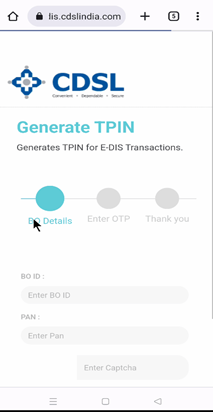
- Through CDSL Website:
- Click here to generate TPIN.
- Fill the details BO ID (Beneficial Owner Identification Number) and PAN Number
- Enter the captcha and click on “Next”
- Validate with OTP.
- Click on “Next”
- You will receive a TPIN on your registered phone number and E-Mail ID.
- Through Tiqs Application:
- Go to the Holdings tab
- Select the Authorisation option.
- Click on the Forgot CDSL TPIN? in the authorisation screen.
- A new TPIN will be sent to your registered mobile number and e-mail ID